

Office space utilization has become one of the most important topics for companies that work in a hybrid or flexible model, or are developing a Smart Office approach. Just a few years ago, many organizations planned their offices in a simple way: one employee meant one workstation. Today, this model increasingly no longer reflects reality. Part of the team works remotely, some employees come to the office only on selected days, and meeting rooms can be both overloaded and underused at the same time.
As a result, companies are starting to ask very specific questions. Is the office actually being used? Which zones have the highest occupancy? Does the number of desks match the team’s real needs? Why are some meeting rooms constantly occupied while others remain empty? Is the organization paying for space that no longer supports its current way of working?
The answers to these questions should not be based on intuition. In the modern office, workplace analytics is becoming increasingly important — the analysis of data on how employees use space, desks, meeting rooms and other company resources. It is data that enables better office planning, cost reduction, improved work comfort and the creation of an environment tailored to the team’s actual needs.
What Is Office Space Utilization?
Office space utilization refers to how employees actually use available floor space, workstations, meeting rooms, shared areas and other office resources. It is not only about how many square meters a company has, but whether that space is truly needed, well planned and used effectively.
In practice, office space utilization may include, among other things:
- the number of occupied and available desks,
- meeting room occupancy,
- the popularity of specific floors, zones or departments,
- days of the week with the highest employee presence,
- peak hours in the office,
- the number of cancelled or unused reservations,
- demand for individual and collaborative workspaces,
- the use of additional resources such as lockers, parking spaces or kiosks.
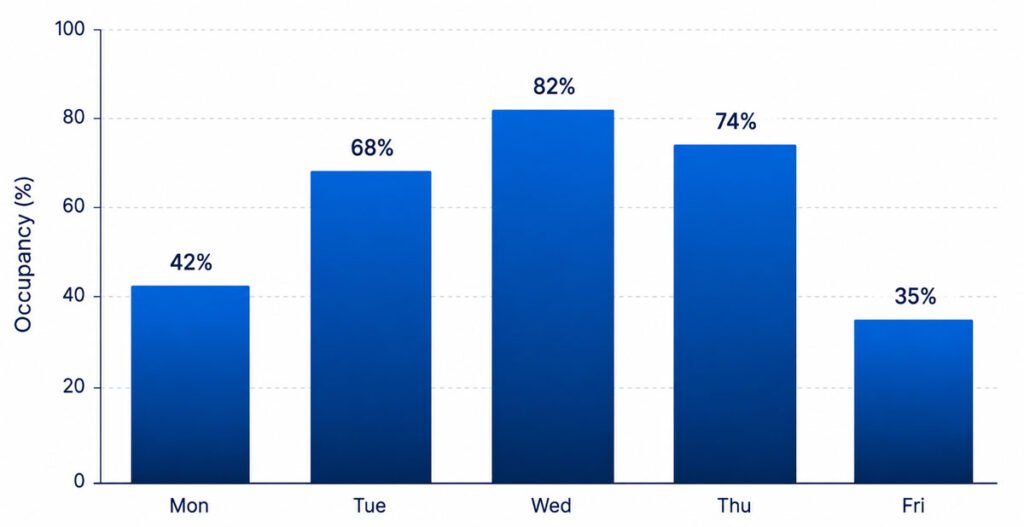
Only by combining this data can a company see how the office really works. It may turn out that the company has enough desks, but their location is the problem. It may also become clear that meeting rooms are frequently booked, but some meetings never take place. It also happens that the office seems empty on Mondays and Fridays, while in the middle of the week there are not enough available places.
That is why simply looking at office floor area is not enough. The key is to understand how the space is used over time.
Why Should Companies Analyze Office Space Utilization?
In many organizations, the office is one of the largest operating costs. Rent, energy, air conditioning, cleaning, equipment, technical support and infrastructure maintenance generate fixed expenses regardless of whether the space is used fully or only a few days a week.
If a company does not analyze office space utilization, it may continue paying for space that no longer reflects its real work model. In hybrid offices, this problem is especially visible. The number of people employed by the company no longer says much about how many employees will actually come to the office on a given day.
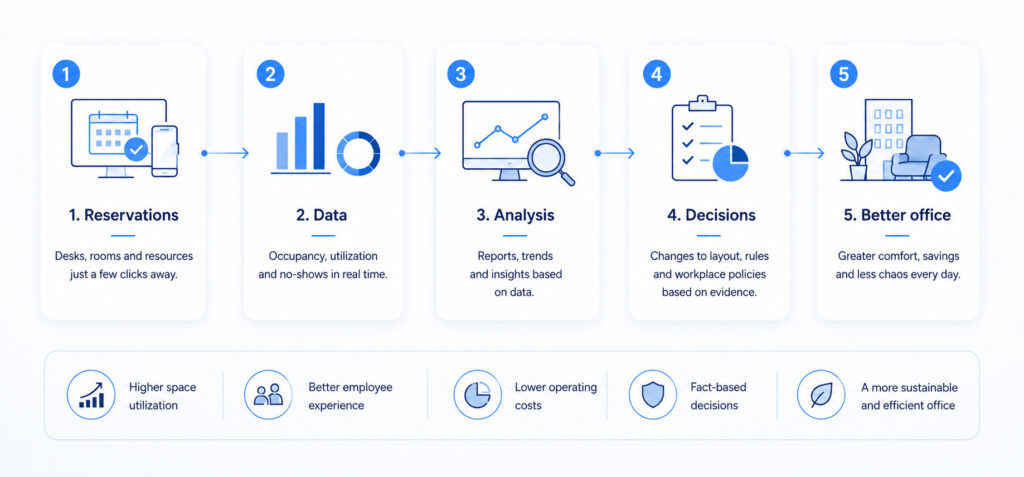
Data analysis helps answer questions that are crucial for office space management:
- Is the office too large, too small or simply poorly organized?
- Which days of the week are the busiest?
- Do employees have access to the right number of desks?
- Are meeting rooms suited to the actual needs of meetings?
- Can some zones be redesigned or used differently?
- Does the hot desking system work conveniently for employees?
- Does reservation data help plan team presence?
Without this information, office-related decisions are often made based on isolated observations. Someone sees an empty space on Friday and concludes that the office is too large. Someone else comes in on Wednesday, cannot find a free meeting room and decides that the company needs more space. Both impressions may be true, but only partially. Only data shows the full picture.
Workplace Analytics: Data Instead of Guesswork
Workplace analytics is the analysis of data related to how the workplace functions. In the context of Smart Office, it primarily includes information on how desks, meeting rooms, shared areas and other office resources are used.
In a traditional office, space management was often based on observations, conversations or spreadsheets. In the modern office, an increasingly important role is played by booking systems, calendar integrations, mobile apps, occupancy sensors, kiosks and room panels. These tools provide data that can later be analyzed.
Workplace analytics makes it possible to check, among other things:
- how many desks are booked each day,
- which workstations are selected most often,
- how many reservations are not used,
- when office occupancy is at its highest,
- which meeting rooms are the most popular,
- which types of meetings most often block space,
- whether employees use the office individually or as teams,
- how space utilization changes after the introduction of hybrid work.
This matters because office space optimization is not only about reducing costs. It is also about creating an office that is functional, intuitive and user-friendly. Good data helps find the right balance between business efficiency and employee comfort.
Office Space Utilization and Hybrid Work
Hybrid work has changed the way companies think about the office. Previously, space was planned mainly around the daily presence of most employees. Today, the office increasingly operates in a changing rhythm. On one day, only a small part of the team may be present; on another, most employees may want to meet on-site.
This causes several common problems:
- uneven office occupancy throughout the week,
- no available desks on popular days,
- empty spaces on days with lower attendance,
- difficulties in planning team work,
- conflicts over meeting rooms,
- lack of predictability for employees,
- inefficient use of expensive office space.
In this environment, office space utilization should be analyzed regularly. The number of available desks alone is not enough. A company needs to know when employees come to the office, who they want to sit with, which zones they use and which resources they need most often.
A desk booking system helps organize this process. Employees can plan their presence in advance, reserve a workstation and check where their team members will be working. From the organization’s perspective, it is equally important that such a system generates data that helps manage office space more effectively.
How to Measure Office Space Utilization
Measuring office space utilization should be based on several types of data. One metric is usually not enough, because the office is a dynamic environment. Desks are analyzed differently from meeting rooms, and shared areas require a different approach as well.
The most important indicators include:
1. Average Office Occupancy
Average office occupancy shows what share of available space is used during a specific period. It can be analyzed daily, weekly, monthly or seasonally. This indicator helps understand the general level of office utilization.
However, the average alone can be misleading. If the office is almost empty on Monday and very crowded on Wednesday, the weekly average may look acceptable, but it will not show the problem of overload on specific days. That is why average occupancy should be combined with peak occupancy analysis.
2. Peak Occupancy
Peak occupancy means the maximum occupancy of an office, floor, zone or room during a given period. This is a very important metric in hybrid offices because it helps determine whether the company is prepared for days with the highest employee presence.
If the office is used at a moderate level on average, but there is a regular shortage of places on selected days, this does not automatically mean that additional space needs to be rented. It may be enough to better distribute team presence, introduce clear booking rules or redesign some zones.
3. Weekly Patterns
Analyzing days of the week shows when employees come to the office most often. In many companies, the highest occupancy occurs in the middle of the week, while the lowest is on Mondays and Fridays. This rhythm has a major impact on planning office services, cleaning, reception, catering, air conditioning and meeting room availability.
Weekly patterns also support organizational decisions. If everyone wants to come to the office on the same day, it is worth considering whether this results from company culture, team meetings, managers’ decisions or a lack of flexible planning.
4. Desk Utilization
Data from a desk booking system shows how many workstations are actually needed, which places are selected most often and whether the current office layout matches employees’ needs.
For example, companies can analyze:
- the number of desk reservations,
- the number of recurring reservations,
- the popularity of specific zones,
- unused reservations,
- team presence in the office,
- location preferences for workstations.
This data is especially important in a hot desking model, where employees do not have permanently assigned seats. If the system is well designed, hot desking does not have to mean chaos. It can become a flexible work model that helps align space with the team’s actual presence.
5. Meeting Room Utilization
A meeting room booking system provides data on how meeting spaces are used. This is one of the most commonly overlooked areas in office analysis, and at the same time one of the most problematic.
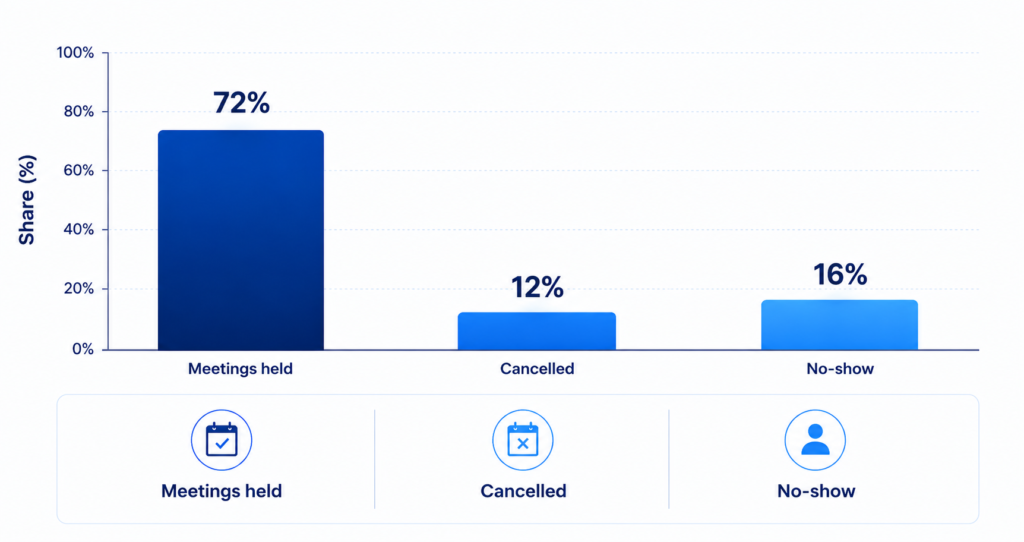
In many companies, meeting rooms are constantly booked, but not always actually used. Employees block rooms “just in case,” fail to cancel meetings or book large rooms for two people. As a result, other users cannot find a place for a meeting, even though some rooms are in fact empty.
It is worth analyzing:
- the number of room reservations,
- meeting duration,
- room size compared with the number of participants,
- cancelled reservations,
- meeting room no-shows,
- the most popular meeting hours,
- overloaded and underused rooms.
Meeting room booking data not only helps improve meeting organization, but also supports better office layout planning. It may turn out that the company needs fewer large rooms and more small rooms for quick meetings. Or that instead of another traditional conference room, a project area, focus room or online call space would be more useful.
Office Space Optimization and Company Costs
Office space optimization is often associated with reducing floor area. In practice, however, it is not always about making the office smaller. Sometimes the most important thing is to plan it better.
A company may have enough space, but an inefficient layout. It may have too many traditional desks and too little collaboration space. It may have many meeting rooms, but rooms that are not matched to team sizes. It may also maintain floors or zones that are used only occasionally.
Office utilization data helps companies make more rational decisions:
- whether to reduce office space,
- whether to redesign workstation layout,
- whether to increase the number of collaboration zones,
- whether to reduce the number of unused desks,
- whether to change meeting room booking rules,
- whether to close selected zones on low-occupancy days,
- whether to adjust energy and service costs to actual employee presence.
This is especially important for companies that are growing, changing their work model or planning a new office space. Data helps avoid two extremes: an office that is too large and generates unnecessary costs, and a space that is too small and causes frustration and organizational problems.
Office Space Management in the Smart Office Model
Smart Office is not only about modern devices, applications and screens. Above all, it is a way of managing the office in which technology supports the daily decisions of employees, administrators, facility managers, HR teams and management boards.
In an intelligent office, systems do not operate separately. Desk booking, room booking, visitor management, employee lockers, information screens and calendar integrations can create a coherent ecosystem. As a result, employees can use the office more easily, while the organization gains data on how the space is actually used.
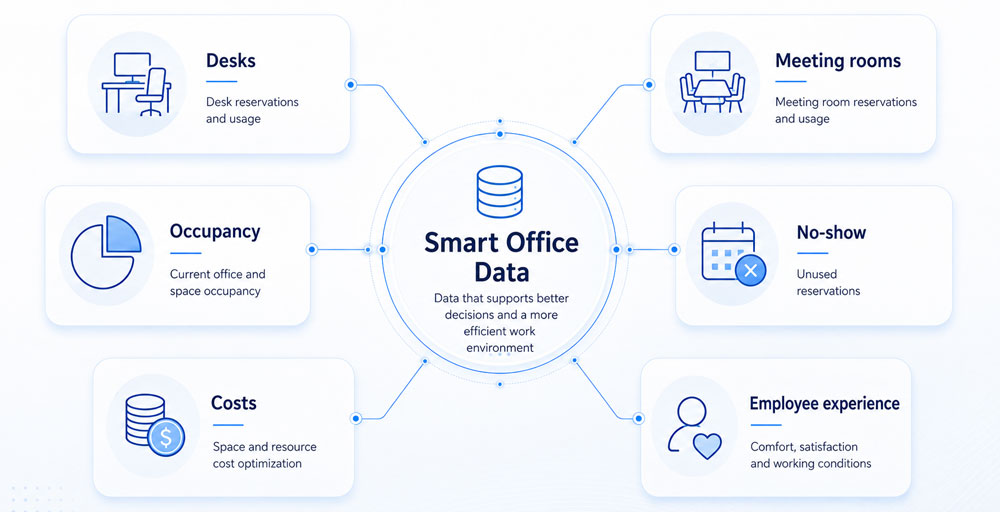
A well-implemented Smart Office helps answer questions such as:
- where specific teams work most often,
- which desks are chosen most frequently,
- which rooms are overloaded,
- whether employees confirm their reservations,
- how much space remains unused,
- how employee presence changes over time,
- whether the office supports collaboration, focus and meetings.
This type of data is particularly valuable for facility managers and office managers. It allows them to move from reactive problem-solving to fact-based planning.
Office Space Utilization and Employee Experience
Office space utilization should not be analyzed only from the cost perspective. The office is also part of the employee experience. If an employee comes to the office and cannot find an available place, a suitable room or a quiet space to work, their frustration increases. If, on the other hand, the office is predictable, clearly marked and easy to use, working on-site becomes more comfortable.
Employee experience in the office depends on many simple everyday situations:
- Does the employee know where to sit?
- Can they book a desk next to their team?
- Can they see meeting room availability?
- Can they quickly find a place for an online call?
- Do they avoid wasting time looking for free space?
- Is the office adapted to different work styles?
Data helps design an office that responds to users’ real behavior. If employees most often choose specific zones, it is worth checking what makes them attractive. If other places remain empty, the issue may be location, noise, lack of equipment or an inconvenient layout.
That is why workplace analytics should support not only management and administration, but also the everyday employee experience.
The Most Common Mistakes in Office Utilization Analysis
Office space utilization analysis can bring enormous value, but only when the data is interpreted correctly. One of the most common mistakes is looking only at overall office occupancy. This indicator can hide problems that only become visible at the level of specific days, hours, floors, rooms or teams.
The second mistake is confusing reservations with actual usage. If an employee booked a desk but did not come to the office, the reservation alone does not show the full truth. The same applies to meeting rooms: a booked room does not always mean that a meeting actually took place.
The third mistake is analyzing data without context. Low occupancy does not always mean there is a problem. It may result from holiday periods, project-based work, seasonality or a specific company policy. High occupancy is also not always positive if it leads to overcrowding, noise and reduced work comfort.
The fourth mistake is treating data as a tool for monitoring employees. Workplace analytics should support better space management, not micro-tracking individuals. Implementing such a system requires transparency, clear communication and respect for privacy.
How to Start Analyzing Office Space Utilization
Companies that want to manage their offices more effectively do not need to implement a complex analytics process right away. It is best to start with a few practical steps.
1. Define What You Want to Measure
At the beginning, it is worth deciding which areas are most important. For one company, it may be desk utilization; for another, meeting room booking; for another, the analysis of team presence in the office. Well-defined questions help choose the right data.
Example questions:
- Do we have the right number of desks?
- Are meeting rooms used effectively?
- Is the office overloaded on selected days?
- Can employees easily find a place to work?
- Does the current office space support the hybrid model?
2. Implement a Desk and Room Booking System
A desk booking system and a meeting room booking system are among the most important data sources in a Smart Office. They help organize everyday use of the space while creating reports that support administrative and business decisions.
Thanks to these systems, a company can analyze which resources are used most often, when overloads occur and where unused reservations appear.
3. Analyze Data Regularly
A one-time report is not enough, because the way teams work changes over time. It is worth analyzing data cyclically: weekly, monthly, quarterly and after major organizational changes.
Comparisons are especially important:
- before and after the introduction of hybrid work,
- before and after changes to the office layout,
- before and after implementing a booking system,
- between different floors or locations,
- between days of the week,
- between teams with different work models.
4. Combine Quantitative Data with Employee Feedback
Data shows what is happening in the office, but it does not always explain why. It is worth combining office utilization reports with surveys, conversations and employee feedback.
If a zone is rarely used, data will show the problem. Employee opinions can explain the cause. Perhaps the place is too noisy, too far from the team, poorly equipped or uncomfortable. Only by combining data and feedback can a company see the full picture.
5. Make Decisions and Test Changes
The greatest value of workplace analytics is not collecting data itself, but turning it into concrete decisions. If reports show that some rooms are underused, their function can be changed. If there are not enough desks on Wednesdays, it is worth reviewing team presence rules. If large rooms are booked for small meetings, recommendations for choosing rooms can be introduced.
Data should lead to action: layout changes, better communication, new booking rules, cost optimization or improved employee experience.
How Does Smart Office Support Office Space Optimization?
Smart Office solutions make it possible to connect everyday office use with data analysis. Employees gain convenient access to desk, room and resource booking, while the company receives information needed to manage space more effectively.
Systems such as URVE Smart Office can support, among other things:
- desk booking in a hot desking model,
- planning office presence,
- meeting room booking,
- meeting management,
- visitor management,
- the use of screens and kiosks,
- office occupancy analysis,
- reports supporting facility management,
- better organization of hybrid work.
As a result, Smart Office is not just a technological add-on to the office. It becomes a tool that helps the company understand its own space and manage it consciously.
Office Space Utilization as an Organizational Advantage
Companies that can analyze office space utilization gain an advantage on several levels. First, they can control costs more effectively. Second, they respond faster to changes in the work model. Third, they create an office that is better suited to employees. Fourth, they make decisions based on data rather than assumptions.
In the modern work environment, the office should not be a static space that is planned once and left unchanged for years. It should function as a flexible ecosystem that can be measured, analyzed and improved.
That is why office space utilization, workplace analytics and Smart Office systems are becoming increasingly important for organizations that want to develop hybrid work without chaos, unnecessary costs and employee frustration.
Summary
Office space utilization is one of the key indicators of modern office management. It shows how employees really use desks, meeting rooms, shared areas and other company resources. In a hybrid work model, this data is essential, because the number of employees alone is no longer enough to plan office space.
Workplace analytics helps companies better understand office occupancy, optimize costs, design a more comfortable work environment and make fact-based decisions. A desk booking system, meeting room booking system and other Smart Office solutions can become sources of data that genuinely support office space management.
A well-planned office is not the largest possible space, but the space best suited to the way the team works. And that cannot be assessed by eye alone. It requires data, analysis and technology that helps turn everyday office use into concrete business insights.
FAQ – Office Space Utilization
What does office space utilization mean?
Office space utilization refers to how employees actually use available desks, meeting rooms, shared areas and other office resources. Analyzing this indicator helps determine whether the space is well aligned with the organization’s needs.
What is workplace analytics?
Workplace analytics is the analysis of data related to how the workplace functions. In the context of Smart Office, it includes data on desk reservations, room occupancy, employee presence, zone utilization and office usage patterns.
How can office space utilization be measured?
Office space utilization can be measured using data from desk booking systems, meeting room booking systems, occupancy sensors, calendar integrations, occupancy reports and weekly or monthly analyses.
Why is office space optimization important?
Office space optimization helps reduce unnecessary costs, plan office layouts more effectively, avoid overloaded rooms and desks, and improve employee comfort in a hybrid work model.
How does a desk booking system support office management?
A desk booking system allows employees to plan their office presence and reserve workstations. At the same time, it provides the company with data on which places are used most often, when occupancy is highest and how to manage space more effectively.
How does a meeting room booking system help analyze the office?
A meeting room booking system shows which rooms are booked most frequently, when most meetings take place, whether there are unused reservations and whether room sizes match the real needs of teams.
Does office utilization analysis mean monitoring employees?
No. Workplace analytics should be used to analyze space, not to control individuals. Its goal is to improve office management, optimize costs and enhance employee experience while maintaining transparency and privacy standards.
How does Smart Office help with hybrid work?
Smart Office organizes office use in a hybrid model. It makes it easier to book desks, rooms and resources, supports planning team presence, and provides data that helps better align the office with the changing rhythm of work.

Doradca klienta